Coming soon · built by an integrator, for integrators

Project software for security, AV and network integrators.

Drawings, devices, cables, installation, closeout and service. Every project in one place, from the office to the job site.

  • Count devices from the drawings, then click any one to see everything about it.
  • Every cable, port and jack labeled, tested and linked.
  • Runs in your web browser on PC and iPad. A phone app with offline mode is planned.
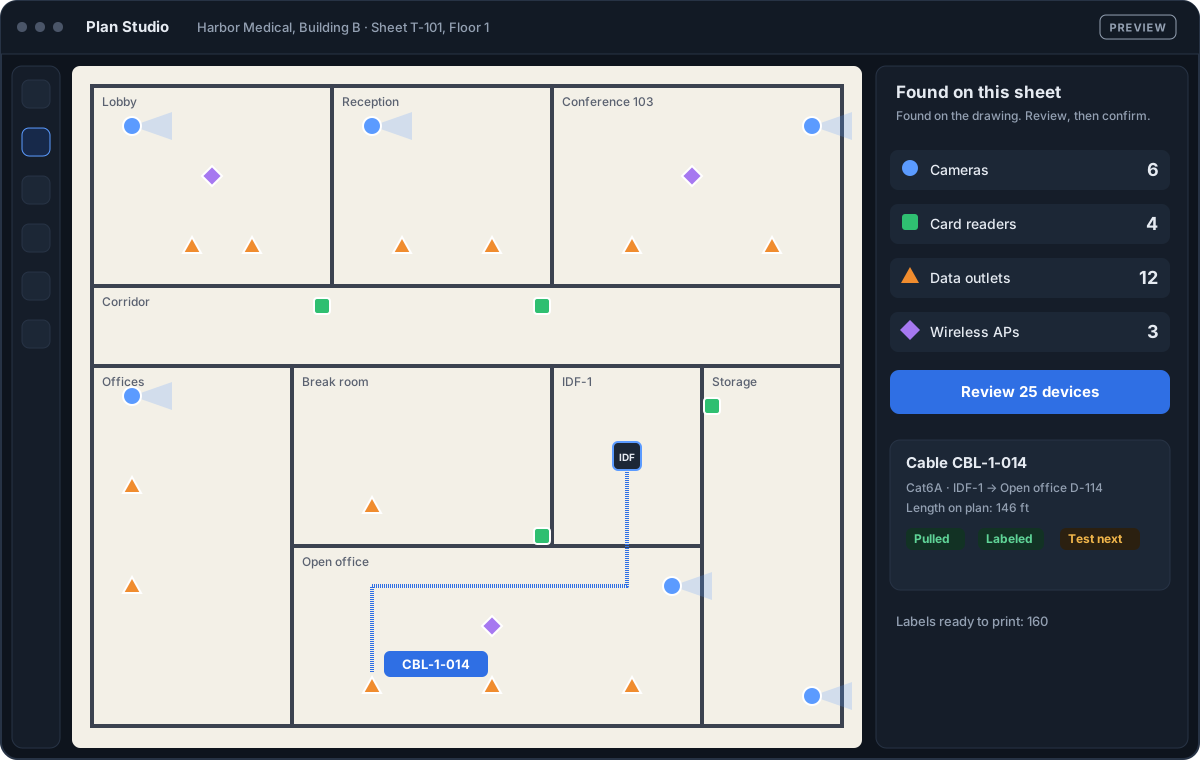
Strandgate Plan Studio: devices are recognized on a floor plan (6 cameras, 4 card readers, 12 data outlets, 3 access points), then a cable from IDF-1 is drawn and labeled CBL-1-014.
Preview of the app in development. Real screen recordings are coming soon.
Made for
  • Video surveillance
  • Access control
  • Intrusion
  • Network & cabling
  • Audio & video
  • Fire alarm (later)
  • Electrical (later)

Every stage of your project, in one place

One click on any device, cable or ticket shows everything about it. No more searching through spreadsheets, PDFs and e-mails.

Plan Studio

Count every device from the drawings

  • Upload PDF floor plans. Strandgate finds cameras, readers, outlets and access points for you to review.
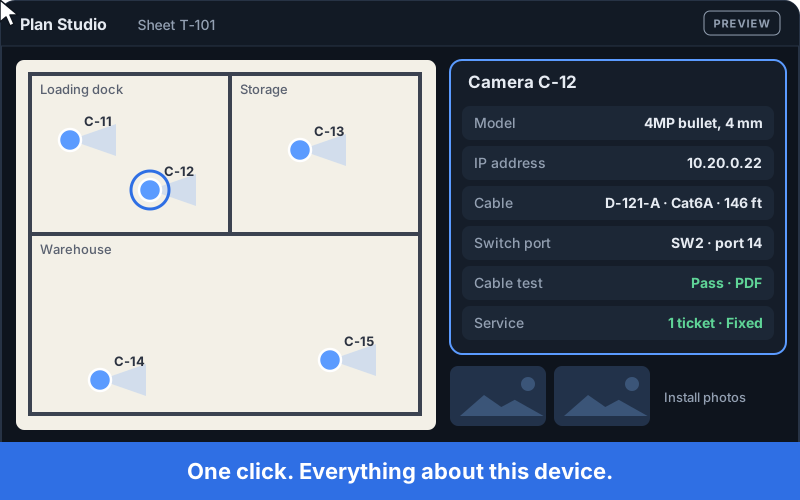
  • Click any device to see its model, IP, cable, switch port, tests, photos and tickets.
  • Counts flow straight into the estimate. No retyping.
Clicking camera C-12 on a floor plan opens its model, IP address, cable, switch port, cable test result, service ticket and install photos in one panel.

Network & Cabling

Every port, cable and jack, documented

  • Switches and racks drawn like the real front panel.
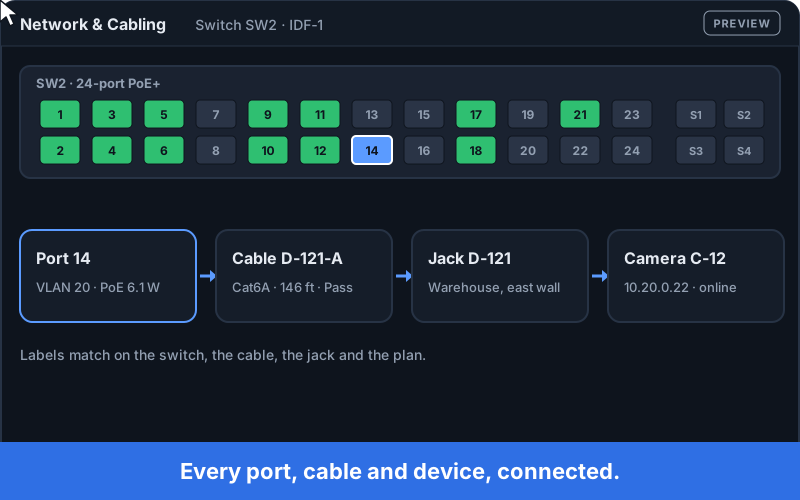
  • Follow any port to its cable, jack and device, with VLAN and PoE.
  • Cable status from Pulled to Tested, with tester results attached.
Clicking port 14 on a switch shows the chain: port with VLAN and PoE, cable D-121-A with a passed test, jack D-121, and camera C-12.

Phone app · coming later

Built for the job site

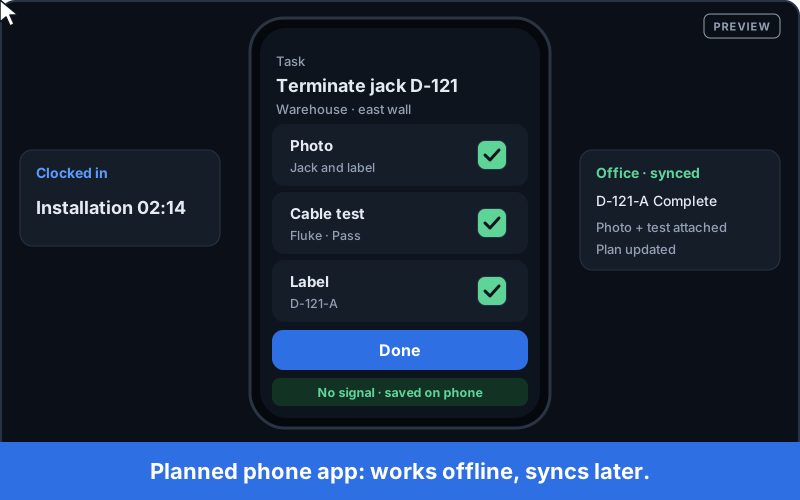
  • Planned for the phone app: clock in by job type, add photos, cable tests and labels right on the task.
  • Planned: offline mode that saves on the phone and syncs when you’re back online.
  • Until then, technicians use Strandgate in the browser on a PC or iPad.
Preview of the planned phone app: a technician adds a photo, a cable test and a label to a task and taps Done with no signal; the office sees it synced.

Closeout

Hand over the project in one click

  • A checklist shows what is still missing before handover.
  • One click builds as-built drawings, device list, tests, photos and warranties.
  • Send the package to your customer with one link.
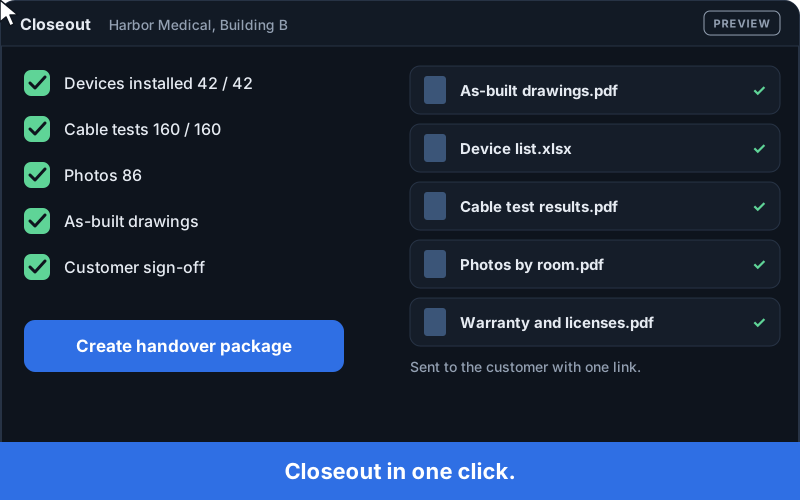
With every checklist item done, one click on Create handover package builds five documents for the customer.

Service

The whole site history, one click away

  • Service tickets are linked to the exact devices, drawings and cable tests.
  • Technicians arrive knowing what is installed and where.
  • Turn findings into quotes for the customer.
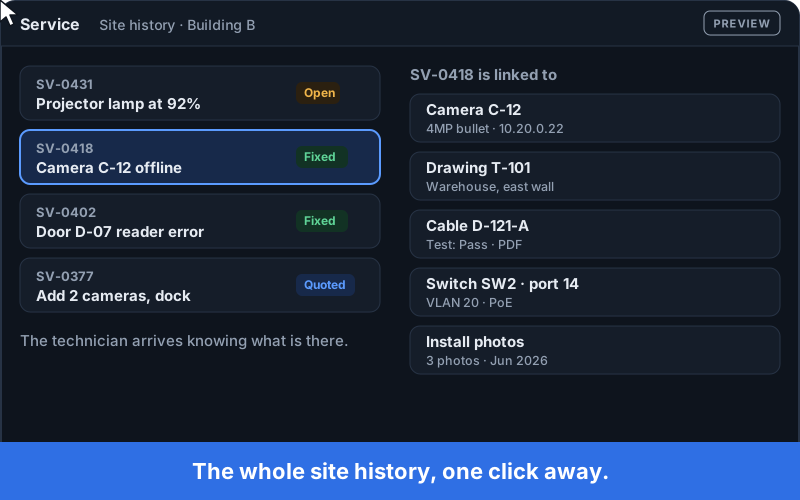
Clicking service ticket SV-0418 shows the camera, drawing, cable test, switch port and install photos linked to it.

Built for your whole team

  • Owners and managers

    Every project, its status and its money in one view.

  • Sales and estimators

    Survey, device counts from drawings, and the estimate in one flow.

  • Engineers and project managers

    Plans, cabling, racks, procurement and the schedule.

  • Technicians

    Today’s tasks, the plan and the devices, in the browser on a PC or iPad. A phone app is planned.

How it works

  1. Upload drawings

    Add your PDF floor plans to a project.

  2. Review the devices

    Strandgate counts them. You check and confirm.

  3. Install and test

    Technicians work from their tasks; cables get labeled and tested.

  4. Hand over and service

    One-click closeout, then the site history is ready for every service call.

Built by an integrator with 15+ years in the field

Strandgate comes from real projects: surveys, cable pulls, rack builds, commissioning and service calls. It is built to replace the spreadsheets, paper plans and lost test results that slow every integrator down.

Founding Partners

A small group of integrators who shape the product with honest feedback. 6 months free, then special Founding Partner pricing, announced before launch. Limited places.

Become a Founding Partner

Help shape Strandgate

5 questions, 2 minutes. Tell us what slows your projects down.

Take the survey

Questions

When can I start using Strandgate?

We plan to launch in 2027. Founding Partners start first. Join the waitlist and we’ll tell you the date as soon as it’s set.

How much will it cost?

Prices are announced before launch. Founding Partners get 6 months free, then special Founding Partner pricing, announced before launch.

Which trades does it cover?

Video surveillance, access control, intrusion, network and cabling, and audio and video. Fire alarm and electrical are planned.

Does it work without internet on the job site?

Not yet. At launch, Strandgate runs in the web browser on PC and iPad and needs an internet connection. A phone and tablet app with offline mode is planned for later.

Do I have to switch everything at once?

No. Start with one new project and keep your current tools running alongside it.

Who can see my company’s data?

Only your company. Each company’s data is kept separate, and you can export it at any time.

Join the waitlist

What do you install?

Choose all that apply.

We use your details only to contact you about Strandgate. Privacy